Available for GoHighLevel & CRM automation projects

I build GoHighLevel systems where no lead goes untouched.

CRM architecture, workflow automation, and business operations design for clinics, agencies, and service businesses. Two complete GoHighLevel environments built from empty sub-account to launch-ready — and documented in full, so you can see exactly how they work.

2End-to-end GoHighLevel CRM builds
84Custom fields architected in one environment
6Automated workflows built and tested
100%Built natively in GoHighLevel — no tool stacking
About

Nine years of being relied on, now pointed at CRM.

I'm Ellen Joy Demonteverde, and I came to CRM automation from an unusual direction. For more than nine years I worked internationally as a personal care assistant.

That isn't the background most people expect in this field, so let me be direct about what it actually taught me: how to be relied on. Care work runs on consistency. Someone's day depends on you turning up, doing exactly what you said you would, and keeping the person who employs you informed without having to be asked. There is no version of that job where "I forgot" is an acceptable answer.

That's the instinct I now bring to systems — because a CRM fails for the same reason a routine fails. A handoff nobody owns. A step nobody wrote down. A follow-up that depended on someone remembering. I build systems so that nothing depends on remembering.

I taught myself GoHighLevel and built two complete CRM environments from empty sub-account to launch-ready — data architecture, pipelines, forms, calendars, workflows, communication, and reporting — then documented both in full. I'm new to this field and I'm not pretending otherwise, which is exactly why I built working systems instead of collecting certificates. The screenshots below are from those builds.

My approach: map the process first, model the data second, automate last. That order is unglamorous, and it's the reason a system stays clean as it scales instead of collapsing into duplicate records and untraceable tags six months in.

  • FocusGoHighLevel CRM · Workflow Automation · AI Automation · Business Systems Operations
  • Background9+ years as a personal care assistant, working internationally · Self-taught in GoHighLevel
  • EngagementsFull CRM builds · Sub-account setup · Automation audits · Ongoing operations support
  • Working styleRemote · Documented · Async-friendly · Process-first
  • Based inIstanbul, Türkiye (GMT+3) — working across European, Gulf, and US time zones
Services

What I build

Every engagement starts with the process, not the platform. The tooling below is how the process gets enforced.

01

CRM Setup & Architecture

Full GoHighLevel sub-account builds: business profile, custom fields, custom values, and a tag taxonomy designed to stay readable as the database grows.

02

Pipeline & Opportunity Design

Sales, renewal, and service pipelines with stages that mean something — so anyone can look at a board and know exactly what happens next.

03

Workflow Automation

Trigger-based automation for lead intake, follow-up sequences, task creation, internal notifications, escalation paths, and date-driven logic.

04

Forms, Funnels & Landing Pages

Intake forms mapped field-by-field to CRM records, plus conversion-focused funnels and websites built inside the platform.

05

Calendar & Booking Systems

Self-serve booking with business-hour availability, confirmations, SMS reminders, and buffers that protect the schedule from itself.

06

Email & SMS Communication

Templated sequences for confirmations, nurture, renewals, and review requests — written in your brand voice, not default platform copy.

07

Reporting & Dashboards

Owner-level visibility across lead volume, pipeline health, win rate, overdue tasks, and service load — instrumented during the build, not bolted on after.

08

AI-Assisted Operations & SOPs

Using AI to accelerate the unglamorous work: drafting communication templates, structuring SOPs, cleaning and mapping data, and documenting the system you just paid for.

Featured Work

Two complete builds, documented end to end

Both are mock client projects created for portfolio demonstration — fictional businesses, real systems. Every pipeline, form, workflow, and dashboard described below was built and tested inside GoHighLevel.

Featured Project 01 Mock client project Medical spa Scottsdale, Arizona

Radiance Aesthetics & Wellness

A complete GoHighLevel CRM and marketing automation system for a boutique medical spa — website and funnel through to repeat-client retention, built entirely on one platform.

The Business Challenge

Radiance offers injectables, advanced facials, and skin rejuvenation to professional women aged 30–55, and its reputation rests on personalised, unhurried care. The problem was that the same personal attention was being consumed by administrative work. Inquiries arrived across several channels with no single place to hold them. Booking required back-and-forth messaging that tied up the front desk. Follow-up depended on whoever happened to remember. No-shows went unaddressed, and there was no reliable way to answer a basic question: how many inquiries actually turn into consultations?

The Solution Implemented

I designed and built the entire system inside GoHighLevel — no third-party tool stacking, no integration debt. The build traces one continuous path from first click to repeat client: a branded website and consultation funnel capture the inquiry, a workflow instantly creates the CRM contact and fires confirmation, the lead enters a defined sales pipeline, and the booking calendar closes the loop with automated confirmations and reminders. Reporting sits on top so ownership can read the health of the business without asking anyone for a status update.

CRM Components Built

Data Architecture

Custom fields and custom values structured around treatment interest, lead source, and client lifecycle stage.

Sales Pipeline

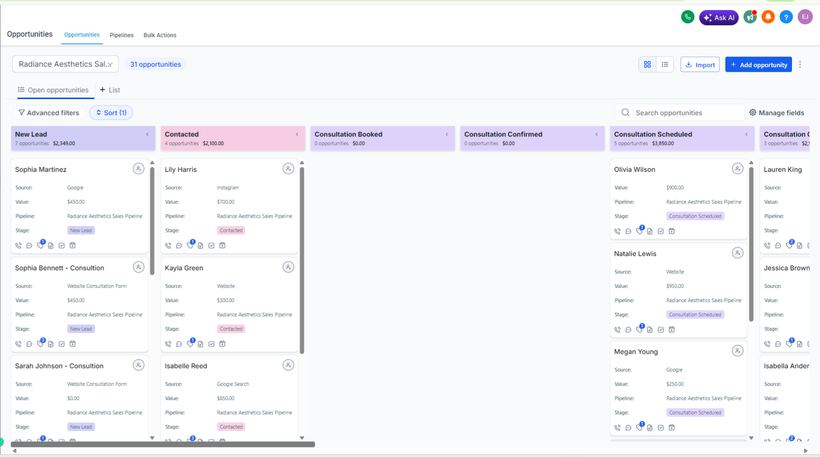
Defined stages tracking a lead from new inquiry through consultation, treatment booked, and repeat client.

Forms & Intake

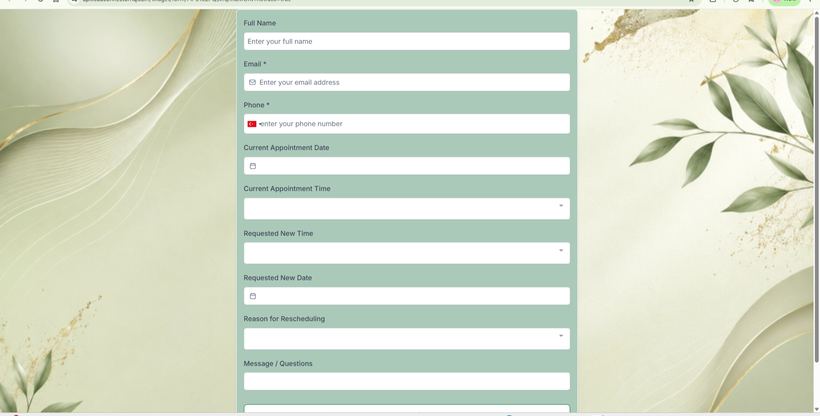
Consultation request form mapped directly to CRM fields, embedded on both the website and the landing funnel.

Calendars & Booking

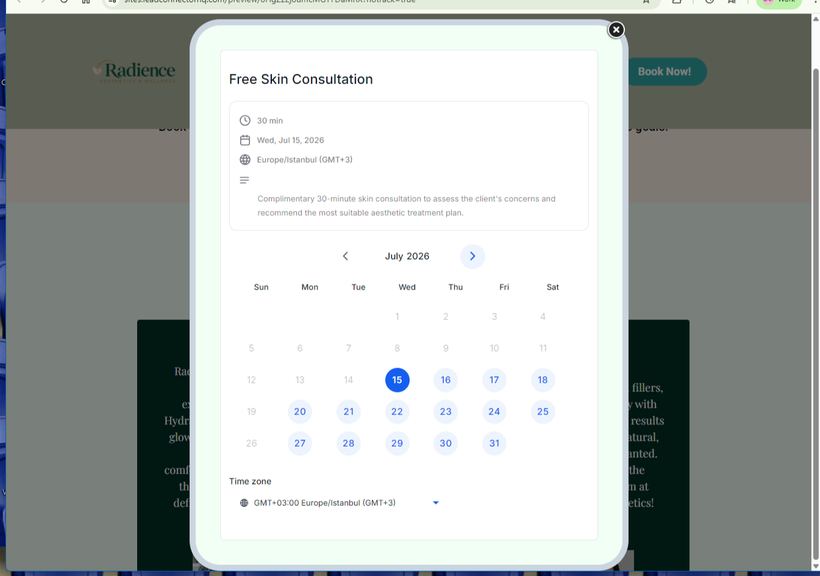
Self-serve appointment booking with availability rules, confirmation emails, SMS reminders, and scheduling buffers.

Workflow Automation

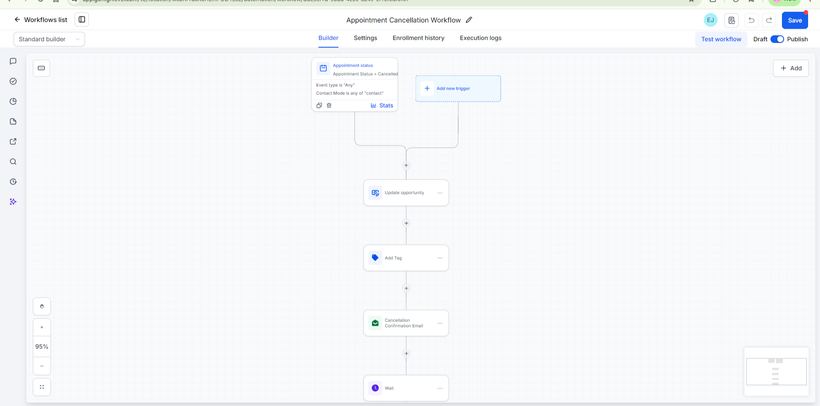
Automatic contact creation on form submission, workflow routing, confirmation and reminder sequences, and review requests after treatment.

Communication Assets

Branded email and SMS templates covering confirmation, reminder, follow-up, and review-request touchpoints.

Website & Funnel

Full responsive site — services, team, testimonials, FAQ, contact — plus a dedicated consultation funnel and thank-you page, built and tested on desktop and mobile.

Reporting Dashboard

Live view of lead volume, booking rates, and pipeline health for owner-level visibility.

Business Impact

  • Every inquiry becomes a tracked CRM contact automatically — nothing depends on a staff member remembering to log it.
  • Booking is self-serve, removing the scheduling back-and-forth that previously sat with front-desk staff.
  • Confirmation and reminder sequences run without manual intervention, directly targeting the no-show problem.
  • Follow-up, retention, and review requests are systematic rather than dependent on capacity that day.
  • Ownership gains one live view of lead volume, booking rate, and pipeline health.
  • Staff time shifts away from administrative chasing and back toward in-person care.

Build Proof

Radiance Aesthetics website hero section built in GoHighLevel, showing headline, booking call-to-action, and trust badges
Website & Landing FunnelResponsive site and consultation funnel, built in-platform
GoHighLevel booking calendar showing free skin consultation slots with date picker and time zone selector
Booking CalendarSelf-serve consultation booking with time-zone handling
Radiance consultation intake form with name, contact, appointment date, and treatment preference fields
Consultation Intake FormEvery field mapped directly to a CRM record
GoHighLevel opportunities board showing leads across new lead, contacted, consultation booked, and confirmed stages
Sales PipelineOpportunities moving through defined stages
GoHighLevel workflow builder canvas showing the appointment consultation automation with trigger and action steps
Workflow BuilderTrigger, conditions, and actions on the automation canvas
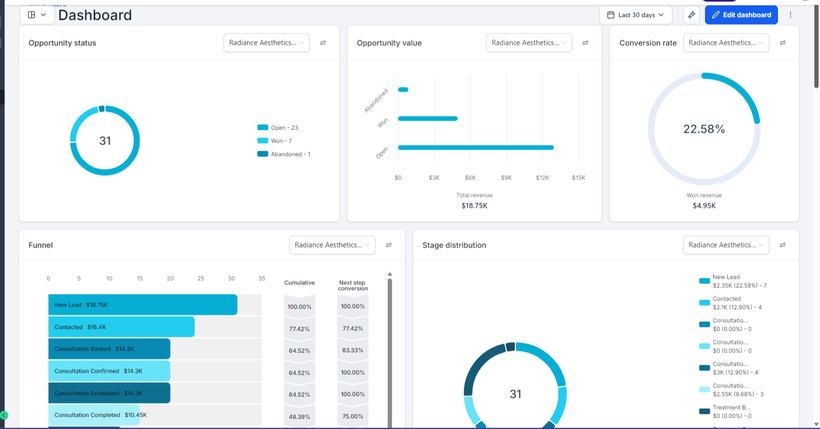
GoHighLevel reporting dashboard with opportunity status, conversion rate, funnel chart, and stage distribution
Reporting DashboardOpportunity status, conversion rate, and stage distribution

↗ Click any screenshot to enlarge. Captured from the live GoHighLevel build.
Featured Project 02 Mock client project Commercial insurance Columbus, Ohio

AnchorPoint Business Insurance LLC

A commercial insurance CRM environment covering new business, underwriting intake, renewal automation, service routing, claims escalation, and compliance-aware process design.

The Business Challenge

A commercial insurance agency runs three operations in parallel — writing new business, protecting renewals, and servicing existing clients — and each has its own timeline and its own failure mode. Quote requests arrive with incomplete underwriting data. Renewals approach silently until they become urgent. Certificate requests and claims land in shared inboxes with no queue, no owner, and no timestamp. AnchorPoint needed a single CRM environment that could hold all three without them contaminating each other, and without duplicate opportunity records multiplying every time a client submitted another form.

The Solution Implemented

I built a three-pipeline architecture in GoHighLevel that separates new business, renewals, and service/claims into distinct operational queues, supported by a deliberately disciplined data model: structured data lives in custom fields, reusable business information lives in custom values, and tags are reserved for segmentation and triggers — never for tracking stage. The critical design decision was making supplemental underwriting forms find and update the existing opportunity rather than create a new one, so every policy keeps a single source of truth. Renewals enter the pipeline automatically 90 days before expiration, and claims intake carries an escalation path for injury-related reports.

CRM Components Built

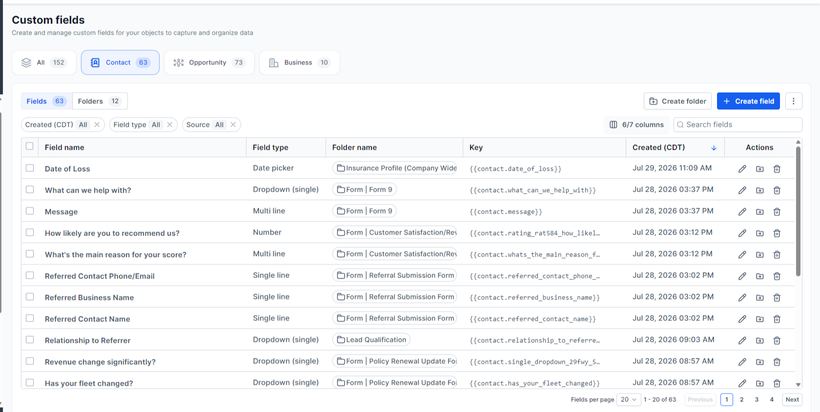
Data Architecture — 84 Custom Fields

31 contact-level and 53 opportunity-level custom fields, 115 approved tags, and 33 custom values, governed by a clear rule for what belongs where.

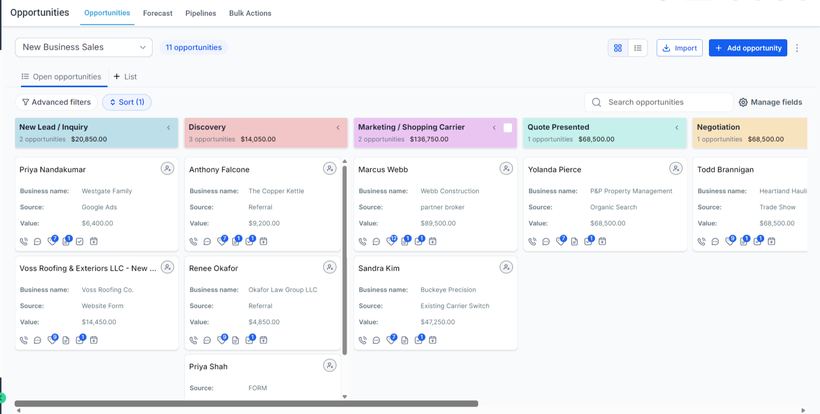
3 Pipelines · 18 Stages

New Business Sales (8 stages, inquiry through bound or lost), Renewal (5 stages, 90/60/30-day cadence), and Client Service & Claims (5 stages, requested through closed).

10 Forms

General quote request, detailed commercial intake, workers' compensation, commercial auto, renewal update, COI request, claims report, general contact, referral, and review request.

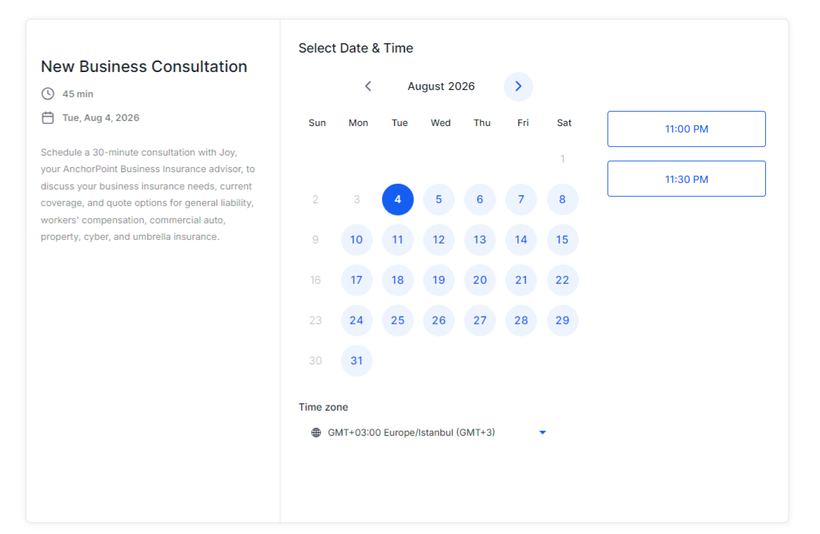
4 Booking Calendars

New business consultation (30 min), renewal review (30 min), client service call (20 min), and claims support (30 min) — each with business-hour availability, confirmations, SMS reminders, and buffers.

6 Automated Workflows

New business intake, supplemental underwriting update, renewal pipeline logic, renewal communication sequence, COI request routing, and claims intake with escalation.

Underwriting Intake Logic

Three supplemental forms — commercial, workers' comp, and commercial auto — that locate the open opportunity, update line-specific underwriting fields, advance underwriting status, and raise a review task.

Reporting Architecture

Sales KPIs (leads, open opportunities, quotes presented, bound, lost, win rate), revenue KPIs (quoted and bound premium, estimated commission, average deal size), and operational KPIs (renewals due in 90 days, overdue tasks, monthly COI and claims volume).

Compliance & Governance

SMS consent language, privacy policy references, insurance licensing disclaimer, and opt-out guidance — with the system scoped as CRM and operations, not a replacement for a licensed Agency Management System.

Business Impact

  • Every website inquiry automatically becomes a CRM contact and a sales opportunity, with a same-day producer call task attached.
  • Underwriting data from three supplemental forms consolidates into one opportunity record — eliminating the duplicate-record problem at its source.
  • Every active policy enters the renewal pipeline 90 days before expiration on a date-driven trigger, rather than depending on someone watching a spreadsheet.
  • Certificate requests and claims route into a dedicated service queue with an assigned owner, a priority level, and a timestamp.
  • Injury-related claims escalate immediately instead of waiting in a general inbox.
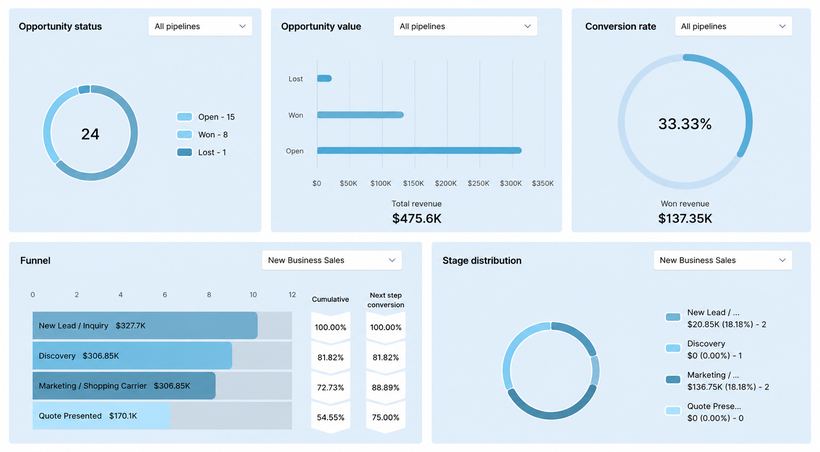
  • Ownership gets one dashboard spanning sales, renewal, service, and claims operations.
  • Consent, disclaimer, and opt-out language is designed into the communication layer rather than retrofitted after the fact.

Build Proof

AnchorPoint executive dashboard in GoHighLevel showing opportunity status, revenue, conversion rate, and stage distribution charts
Executive DashboardOpportunity status, pipeline value, and win rate in one view
AnchorPoint new business sales pipeline board with opportunities across new lead, discovery, marketing to carrier, quote presented, and negotiation stages
New Business PipelineEight stages from inquiry through binding, with values per stage
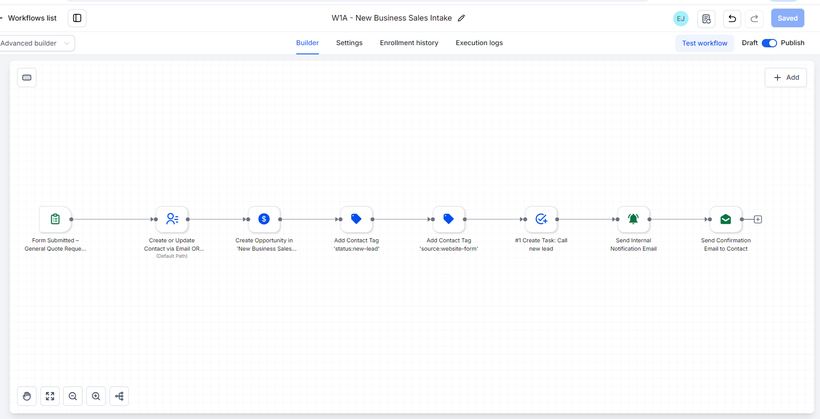
GoHighLevel workflow canvas for AnchorPoint new business intake showing sequential tag, opportunity, task, and notification steps
WF01 — New Business IntakeForm → tags → opportunity → task → notification → confirmation
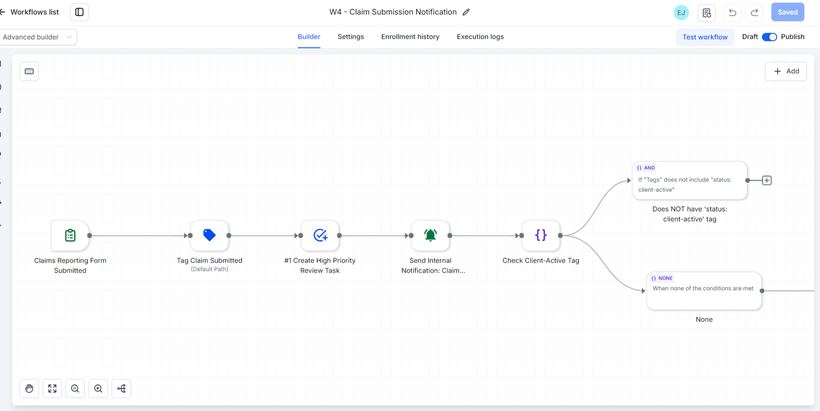
AnchorPoint claims intake workflow with conditional branching logic that escalates injury-related claims
WF04 — Claims IntakeConditional branching that escalates injury-related claims
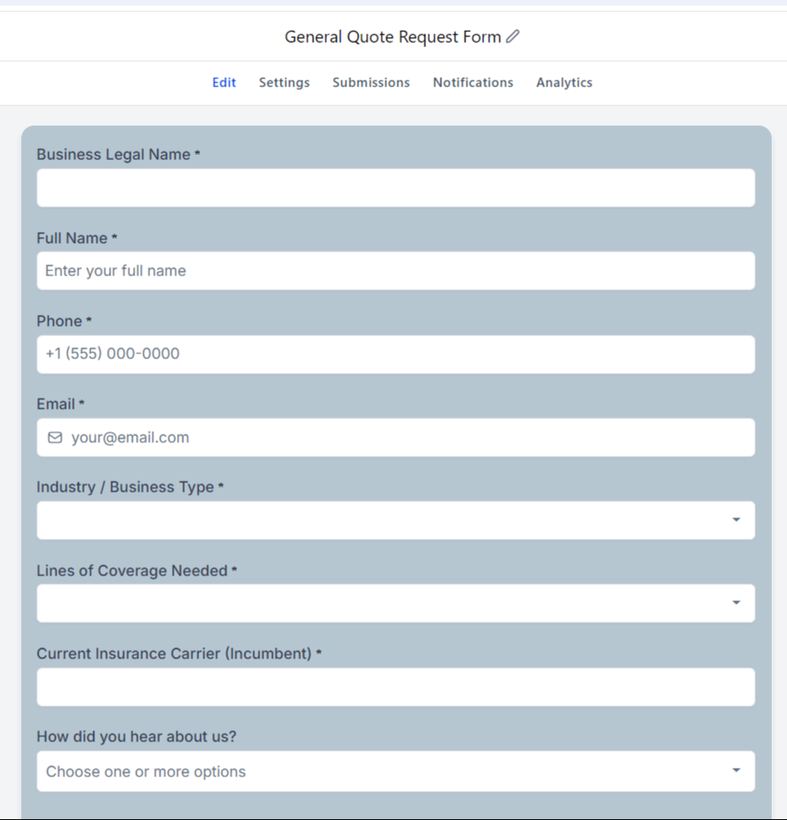
AnchorPoint general quote request form showing business legal name, industry type, lines of coverage, and incumbent carrier fields
Quote Request FormOne of ten intake forms across sales, service, and claims
GoHighLevel custom fields table for AnchorPoint showing field names, types, folders, and unique keys
Custom Field ArchitecturePart of the 84-field data model — typed, foldered, and keyed
AnchorPoint commercial insurance landing funnel built in GoHighLevel, with hero headline and quote request call to action
Lead Generation FunnelThe public-facing page that feeds the intake workflow
AnchorPoint new business consultation booking calendar showing date picker, available time slots, and time zone
Booking CalendarOne of four calendars — availability, slots, and time zones

↗ Click any screenshot to enlarge. Captured from the live GoHighLevel build.
Workflow & Automation Expertise

Automation is the last step, not the first

Most CRM builds fail because automation gets switched on before anyone agrees what the process is. I work in a fixed order — and the order is the method.

01

Map the process

Document how work actually moves today, including the informal steps nobody wrote down. Identify where handoffs drop.

02

Model the data

Decide what belongs in custom fields, custom values, and tags — before a single record is created. This decision is expensive to reverse.

03

Build the pipelines

Define stages that describe a real operational state, with clear exit criteria. One stage, one meaning, one place.

04

Automate

Layer triggers, conditions, tasks, notifications, and sequences on top of a structure that can already support them.

05

Instrument

Build reporting during the implementation, so the metrics reflect the process instead of whatever the platform happens to track by default.

06

Test & document

Run live end-to-end submissions, verify every field lands correctly, then hand over written documentation of how the system works.

Automation capabilities

Trigger design — form submission, date-based, stage change, tag applied
Conditional logic and branching paths
Create-vs-update opportunity logic for duplicate prevention
Date-math triggers (e.g. expiration date minus 90 days)
Task creation, assignment, and priority levels
Internal notifications and team routing
Escalation paths for urgent and high-risk cases
Multi-step email and SMS sequences with timed delays
Appointment confirmations, reminders, and no-show follow-up
Review and referral request automation
Field mapping from intake forms to CRM records
Tag governance and segmentation strategy

Implementation principles

The rules I build by — each one learned by watching what happens when they're ignored.

  • Structured data belongs in custom fields. Tags are for segmentation and triggers, not storage.
  • One opportunity per policy line or service line — never one per conversation.
  • New business and renewals get separate pipelines. They are different processes with different clocks.
  • Never track the same stage in two places. Duplicate state is how reporting starts lying to you.
  • Reusable business information lives in custom values, so a change is made once, not fifty times.
  • Supplemental forms update existing records. They do not create duplicates.
Tools & Platforms

The stack I work in

GoHighLevel is my specialism — the platform I architect in end to end. Everything below it supports that work: a second CRM for teams already invested elsewhere, and the automation layer for anything that needs to talk to a system outside the CRM.

Core Platform — GoHighLevel

CRM & Contacts Opportunities & Pipelines Workflow Automation Forms & Surveys Calendars & Booking Funnels & Websites Email Marketing SMS Automation Custom Fields & Values Tags & Segmentation Dashboards & Reporting Sub-Account Setup Snapshots & Templates Agency & Client Sub-Accounts

Automation & Integration

Zapier Make n8n Pabbly Connect Webhooks API Integrations Google Sheets Automation Calendly Stripe & Payment Triggers Twilio (SMS) Mailgun (Email)

Design & Documentation

Canva Loom Process documentation & SOPs

CRM & Marketing — HubSpot

HubSpot CRM Contacts & Companies Deals & Pipelines Forms & Landing Pages Workflows & Sequences Lists & Segmentation Email Marketing Properties & Data Management Reporting Dashboards

AI & Productivity

ChatGPT Claude AI-assisted copy & SOP drafting Prompt design for operations AI data cleaning & field mapping

Operations & Collaboration

Google Workspace Microsoft 365 Notion Slack Zoom Trello Asana ClickUp
Portfolio Highlights

Key achievements

Figures below describe what was designed and built. They are build facts, not performance claims.

2Complete GoHighLevel environments designed and built from empty sub-account to launch-ready
84Custom fields architected in a single CRM environment, with 115 governed tags
3Parallel operational pipelines running in one sub-account without collision
9+Years of international work as a personal care assistant, before moving into CRM systems
Get in touch

Let's map your system.

Whether you're an agency owner who needs a GoHighLevel sub-account built properly the first time, a business owner buried in manual follow-up, or a recruiter looking for someone who thinks in systems — I'd like to hear what you're working on. Discovery calls are free, roughly 30 minutes, and end with a clear recommendation whether or not we work together.

Email elleninternational32@gmail.com
Phone / WhatsApp +90 536 957 05 26
LinkedIn linkedin.com/in/ellenjoy-demonteverde
Response time

Within 24 hours, business days

Availability

Open to new projects